SSH banner warnings are crucial when companies or organizations want to show a strict warning message to discourage unauthorized users from accessing a Linux server.
These SSH banner warning messages are displayed just before the SSH password prompt so that unauthorized users who are about to gain access are made aware of the aftermath of doing so. Typically, these warnings are legal consequences that unauthorized users can suffer should they decide to ahead with accessing the server.
Be cautious that a banner warning is by no means a way of blocking unauthorized users from logging in. The warning banner is simply a warning meant to warn unauthorized users from logging in. If you want to block unauthorized users from logging in, then additional SSH configurations are required.
The SSH banner contains some security warning information or general information. Following are some example SSH banner messages which I use on my Linux servers.
Example SSH Banner Message 1:
Example SSH Banner Message 2:
There are two ways to display messages one is using the issue.net file and the second one is using the MOTD file.
- /etc/issue.net – Display a warning banner message before the password login prompt.
- /etc/motd – Display a welcome banner message after the user has logged in.
So, I strongly recommended all system administrators display banner messages before allowing users to log in to systems. Just follow below simple steps to enable SSH logging messages.
Display SSH Warning Message to Users Before Login
To display SSH warning messages to all unauthorized users, you need to access the /etc/issue.net file to display banner messages using your preferred text editor.
Add the following banner sample message and save the file. You can add any custom banner message to this file.
Next, open the /etc/ssh/sshd_config configuration file.
Search for the word “Banner” and uncomment out the line and save the file.
It should be like this.

Next, restart the SSH daemon to reflect new changes.
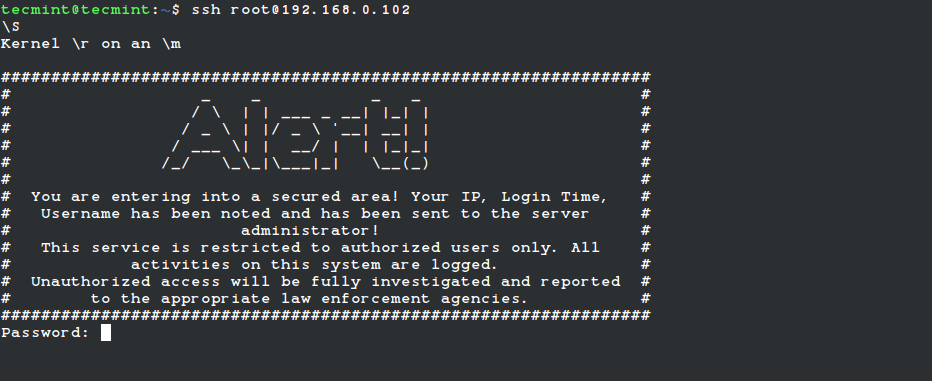
Now try to connect to the server you will see a banner message similar to below.
Display SSH Welcome Message to Users After Login
To display SSH welcome banner messages after login, we use /etc/motd file, which is used to display banner messages after login.
Place the following welcome banner sample message and save the file.
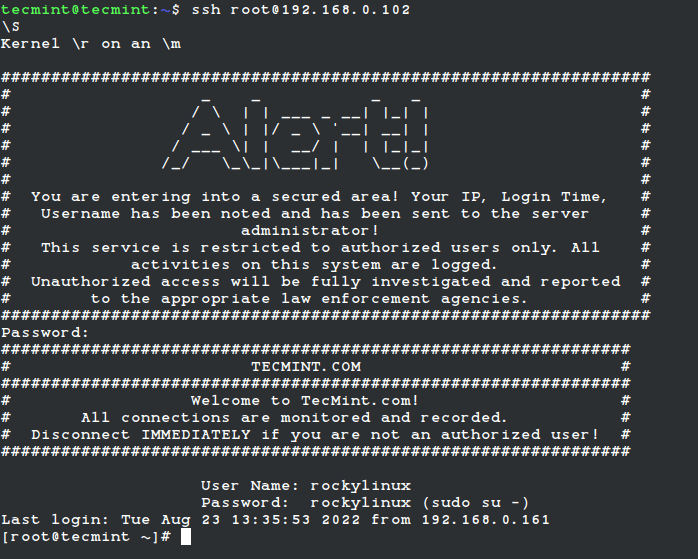
Now again try to login into the server you will get both banner messages. See the screenshot attached below.


No comments:
Post a Comment