Introduction
In the fast-paced realm of website management, the quest for a scalable, reliable, and efficient platform is never-ending. Enter Kubernetes – the revolutionary container orchestration tool that has transformed the way we deploy, manage, and scale applications in modern IT environments.
What is Kubernetes?
Kubernetes, often abbreviated as K8s, is an open-source container orchestration platform originally developed by Google and now maintained by the Cloud Native Computing Foundation (CNCF). At its core, Kubernetes automates the deployment, scaling, and management of containerized applications, providing a unified platform for orchestrating workloads across a cluster of machines.
We configured our kubernetes cluster with the following settings:
| master node | master.localdomain |
| No. of worker nodes | 3 (wk1.localdomain, wk2.localdomain, wk3.localdomain) |
| RAM | 4 GB |
| Cores | 2 |
| Docker Version | Docker version 25.0.1, build 29cf629 |
| Kubectl Version | { “clientVersion”: { “major”: “1”, “minor”: “29”, “gitVersion”: “v1.29.1”, “gitCommit”: “bc401b91f2782410b3fb3f9acf43a995c4de90d2”, “gitTreeState”: “clean”, “buildDate”: “2024-01-17T15:51:03Z”, “goVersion”: “go1.21.6”, “compiler”: “gc”, “platform”: “linux/amd64” }, “kustomizeVersion”: “v5.0.4-0.20230601165947-6ce0bf390ce3” } |
| Kubernetes Version | v1.28.3 |
| Operating System (OS) Images | Debian GNU/Linux 11 (bullseye) |
The Symphony of Kubernetes: Orchestrating Your WordPress
Imagine Kubernetes as the conductor of a symphony orchestra, meticulously coordinating each instrument to create a harmonious melody. Similarly, Kubernetes orchestrates the various components of your WordPress application – from the web server to the database – ensuring they work in concert to deliver a seamless user experience.
Empowering WordPress Users with Cloud-Native Hosting
At its essence, Kubernetes abstracts away the complexities of infrastructure management, allowing you to focus on what truly matters – building and maintaining your WordPress website. Whether you’re a seasoned developer or a novice user, Kubernetes offers a level playing field for deploying WordPress applications, democratizing access to enterprise-grade infrastructure capabilities.
Deploying WordPress on Kubernetes: Step-by-Step Instructions
Now, let’s delve into the nitty-gritty of deploying WordPress on Kubernetes and unleash the power of cloud-native hosting for your website.
Setting Up Your Kubernetes Cluster
Before deploying WordPress, you need to have a Kubernetes cluster up and running. You can choose from various Kubernetes distributions like Minikube for local development or managed services like Google Kubernetes Engine (GKE), Amazon Elastic Kubernetes Service (EKS), or Azure Kubernetes Service (AKS) for production environments.
Setting up your Kustomization YAML file
Generate a secret
[admin@master wordpress-deployment]$ cat <<EOF >./kustomization.yaml
secretGenerator:
- name: mysql-pass
  literals:
  - password=YOUR_PASSWORD
EOFDeploying MySQL Database
WordPress relies on a database to store its content and configuration. We’ll start by deploying a MySQL database on Kubernetes. Below is an example YAML manifest for deploying MySQL:
apiVersion: v1
kind: Service
metadata:
  name: wordpress-mysql
  labels:
    app: wordpress
spec:
  ports:
    - port: 3306
  selector:
    app: wordpress
    tier: mysql
  clusterIP: None
---
apiVersion: v1
kind: PersistentVolumeClaim
metadata:
  name: mysql-pv-claim
  labels:
    app: wordpress
spec:
  accessModes:
    - ReadWriteOnce
  resources:
    requests:
      storage: 5Gi
---
apiVersion: apps/v1
kind: Deployment
metadata:
  name: wordpress-mysql
  labels:
    app: wordpress
spec:
  selector:
    matchLabels:
      app: wordpress
      tier: mysql
  strategy:
    type: Recreate
  template:
    metadata:
      labels:
        app: wordpress
        tier: mysql
    spec:
      containers:
      - image: mysql:8.0
        name: mysql
        env:
        - name: MYSQL_ROOT_PASSWORD
          valueFrom:
            secretKeyRef:
              name: mysql-pass
              key: password
        - name: MYSQL_DATABASE
          value: wordpress
        - name: MYSQL_USER
          value: wordpress
        - name: MYSQL_PASSWORD
          valueFrom:
            secretKeyRef:
              name: mysql-pass
              key: password
        ports:
        - containerPort: 3306
          name: mysql
        volumeMounts:
        - name: mysql-persistent-storage
          mountPath: /var/lib/mysql
      volumes:
      - name: mysql-persistent-storage
        persistentVolumeClaim:
claimName: mysql-pv-claimThis deployment is setting up a MySQL database for a WordPress application in a Kubernetes cluster. It consists of three main components: a Service, a PersistentVolumeClaim, and a Deployment.
The Service wordpress-mysql exposes port 3306 for MySQL communication and selects pods with the labels app: wordpress and tier: mysql. The PersistentVolumeClaim mysql-pv-claim requests 5Gi of storage with ReadWriteOnce access mode to store MySQL data persistently.
The Deployment wordpress-mysql ensures the desired state of the MySQL pods, pulling the mysql:8.0 image, setting environment variables for database configuration, and mounting persistent storage for data storage at /var/lib/mysql.
Copy and paste the contents above to a file called mysql.yaml (or your preferred name).
Deploying WordPress
With the MySQL database running, we can now deploy WordPress. Below is an example YAML manifest for deploying WordPress with NGINX Ingress:
apiVersion: v1
kind: Service
metadata:
  name: wordpress
  labels:
    app: wordpress
spec:
  ports:
    - port: 80
  selector:
    app: wordpress
    tier: frontend
  type: LoadBalancer
---
apiVersion: v1
kind: PersistentVolumeClaim
metadata:
  name: wp-pv-claim
  labels:
    app: wordpress
spec:
  accessModes:
    - ReadWriteOnce
  resources:
    requests:
      storage: 5Gi
---
apiVersion: apps/v1
kind: Deployment
metadata:
  name: wordpress
  labels:
    app: wordpress
spec:
  selector:
    matchLabels:
      app: wordpress
      tier: frontend
  strategy:
    type: Recreate
  template:
    metadata:
      labels:
        app: wordpress
        tier: frontend
    spec:
      containers:
      - image: wordpress:6.2.1-apache
        name: wordpress
        env:
        - name: WORDPRESS_DB_HOST
          value: wordpress-mysql
        - name: WORDPRESS_DB_PASSWORD
          valueFrom:
            secretKeyRef:
              name: mysql-pass
              key: password
        - name: WORDPRESS_DB_USER
          value: wordpress
        ports:
        - containerPort: 80
          name: wordpress
        volumeMounts:
        - name: wordpress-persistent-storage
          mountPath: /var/www/html
      volumes:
      - name: wordpress-persistent-storage
        persistentVolumeClaim:
claimName: wp-pv-claimThis deployment is setting up a WordPress application in a Kubernetes cluster. It consists of three main components: a Service, a PersistentVolumeClaim (PVC), and a Deployment.
The Service named “wordpress” exposes port 80 for external access and selects pods with the labels app: wordpress and tier: frontend. The PVC named “wp-pv-claim” requests 5Gi of storage with ReadWriteOnce access mode to persistently store WordPress data.
The Deployment named “wordpress” ensures the desired state of the WordPress pods, pulling the wordpress:6.2.1-apache image, setting environment variables for database configuration, and mounting persistent storage for data storage at /var/www/html.
Copy and paste the contents above to a file called wordpress.yaml (or your preferred name).
Append the Kustomization.yaml file
Once you’ve created the MySQL and WordPress YAML files, along with the kustomization file, your working directory should resemble the following (below):
[admin@master wordpress-deployment]$ ls -lh
total 12K
-rw-r--r--. 1 admin admin   74 Feb  3 17:40 kustomization.yaml
-rw-r--r--. 1 admin admin 1.5K Feb  3 17:43 mysql.yaml
-rw-r--r--. 1 admin admin 1.4K Feb 3 17:43 wordpress.yamlNow copy and paste the following (below) to your command-line to add the resource entries to the kustomization file.
[admin@master wordpress-deployment]$ cat <<EOF >>./kustomization.yaml
resources:
  - mysql.yaml
  - wordpress.yaml
EOFThe contents of the kustomization.yaml file should resemble what is displayed below:
[admin@master wordpress-deployment]$ cat kustomization.yaml
secretGenerator:
- name: mysql-pass
  literals:
  - password=YOUR_PASSWORD
resources:
  - mysql.yaml
- wordpress.yamlDeploying WordPress on Kubernetes: Apply and Verify Instances
Now let’s deploy the kustomization.yaml with the following command:
$ kubectl apply -k ./secret/mysql-pass-df44tkf8t9 created
service/wordpress created
service/wordpress-mysql created
persistentvolumeclaim/mysql-pv-claim created
persistentvolumeclaim/wp-pv-claim created
deployment.apps/wordpress created
deployment.apps/wordpress-mysql createdCheck the running status of the pods with the following command:
$ kubectl get podsNAME READY STATUS RESTARTS AGE
wordpress-cd74ffcf-2gz2v 0/1 ContainerCreating 0 2m25s
wordpress-mysql-86f59dbdd7-h6tmx 1/1 Running 0 2m25sCheck and verify the status of the PVCs using this command. As you can see (below), the persistent volumes are bound and dynamically provisioned.
$ kubectl get pvcNAME STATUS VOLUME CAPACITY ACCESS MODES STORAGECLASS AGE
mysql-pv-claim Bound pvc-06040cc7-20e9-49c6-8940-d7657fb303a7 5Gi RWO standard 3m50s
wp-pv-claim Bound pvc-6087efab-efab-492a-b46e-d9c6e249bf10 5Gi RWO standard 3m50sIn addition, check the status of the secret to ensure it was generated successfully (as shown below):
$ kubectl get secret
NAME                    TYPE     DATA   AGE
mysql-pass-df44tkf8t9 Opaque 1 13mCheck the status of the wordpress service:
$ kubectl get services wordpressNAME TYPE CLUSTER-IP EXTERNAL-IP PORT(S) AGE
wordpress LoadBalancer 10.128.80.159 139.144.240.166 80:31552/TCP 5m13sThe wordpress service is running and provides information (EXTERNAL-IP address: 139.144.240.166) we will need to view our website. Simply enter the URL http://<your-external-IP> to launch the WordPress installation page.
Rest assured that if you encounter pending instances, there’s no cause for alarm. It’s normal for all components to take a few minutes to become operational. Feel free to take a break, enjoy a coffee, or grab a quick snack, and return shortly.
However, if your deployments remain pending for more than 15-20 minutes, it’s advisable to consider allocating additional system resources, such as RAM or cores, to your worker nodes. Alternatively, you can explore deploying WordPress on a Minikube cluster, which is better suited for running test deployments and may provide a smoother experience.
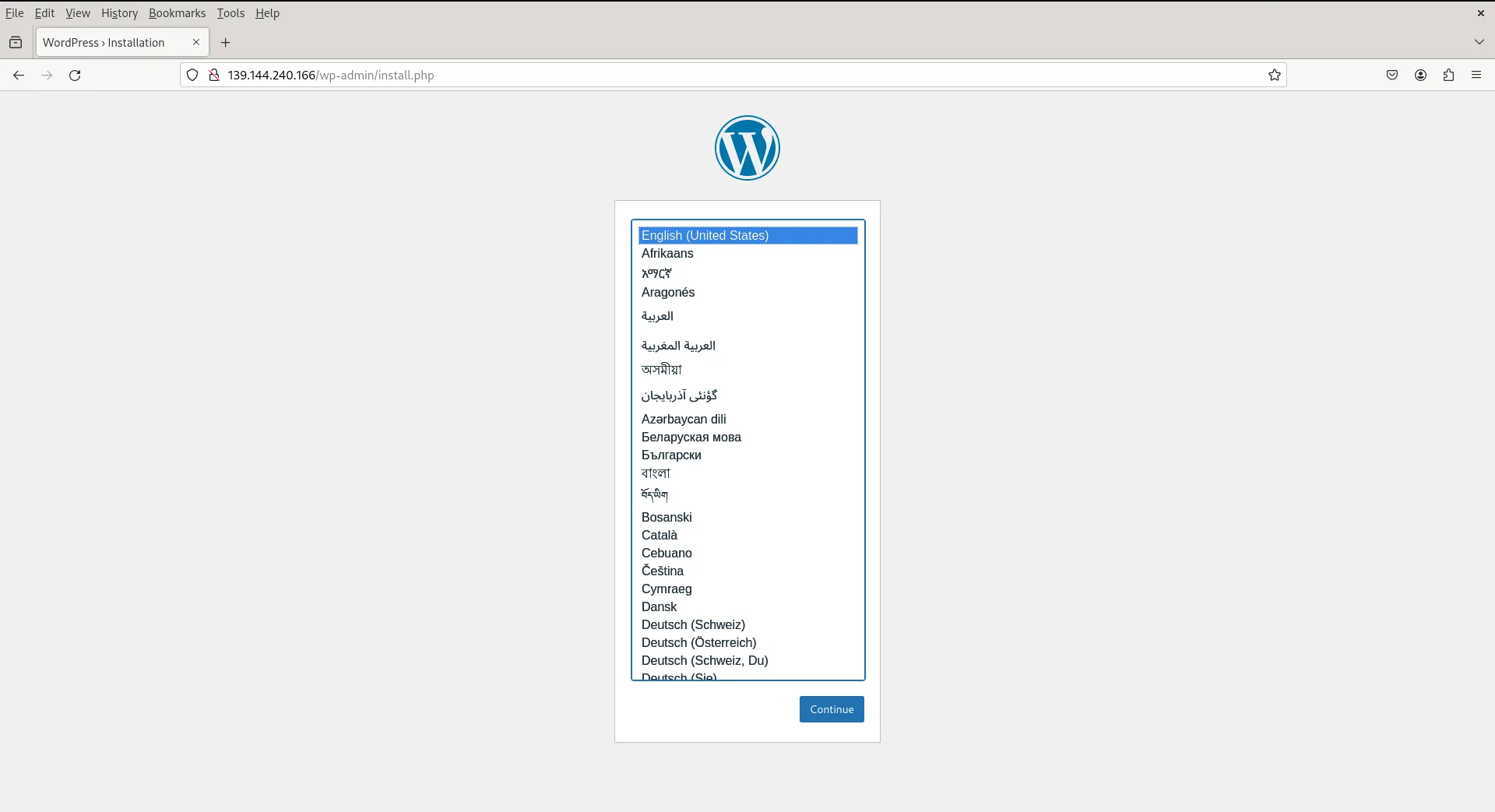
Photo by admingeek from Infotechys
Well done! Your WordPress site has been successfully deployed on Kubernetes. Now, you can move forward with configuring your WordPress site or execute the command below to remove your deployments and deploy something else!
$ kubectl delete -k ./


No comments:
Post a Comment