Introduction
SSH (Secure Shell) is a critical protocol for securely managing servers, especially on Linux-based distributions like RHEL 9 and CentOS 9. While SSH is a robust tool for remote administration, there are common security issues that arise during its setup and operation. One of the most concerning is the use of weak key exchange algorithms, which can leave your system vulnerable to attacks such as man-in-the-middle (MITM) and brute-force attacks.
In this blog post, we’ll dive into the issue of weak key exchange algorithms in SSH, provide detailed instructions for resolving the issue on RHEL 9 or CentOS 9, and guide you through securing your SSH setup to enhance server security.
What Are SSH Key Exchange Algorithms? |
Before we delve into how to fix weak key exchange algorithms, let’s take a moment to understand what they are. SSH key exchange algorithms are the cryptographic protocols used to securely exchange cryptographic keys between the client and the server. The key exchange process is a critical component of the SSH protocol, enabling secure communication between two systems over an untrusted network.
During the key exchange, the server and client agree on which encryption methods to use, and they generate shared secrets, which are then used to encrypt the communication session. If weak or outdated key exchange algorithms are used, it can compromise the security of the entire session.
Identifying Weak Key Exchange Algorithms |
In SSH, weak key exchange algorithms can expose your server to various types of cryptographic attacks, potentially compromising the integrity of your secure connections. These weak algorithms may be outdated or rely on smaller key sizes that modern computational capabilities can break or exploit. As a result, it’s crucial to identify and disable any algorithms that are considered weak or insecure.
Here’s a breakdown of some of the most common weak key exchange algorithms in SSH, along with a brief explanation of each:
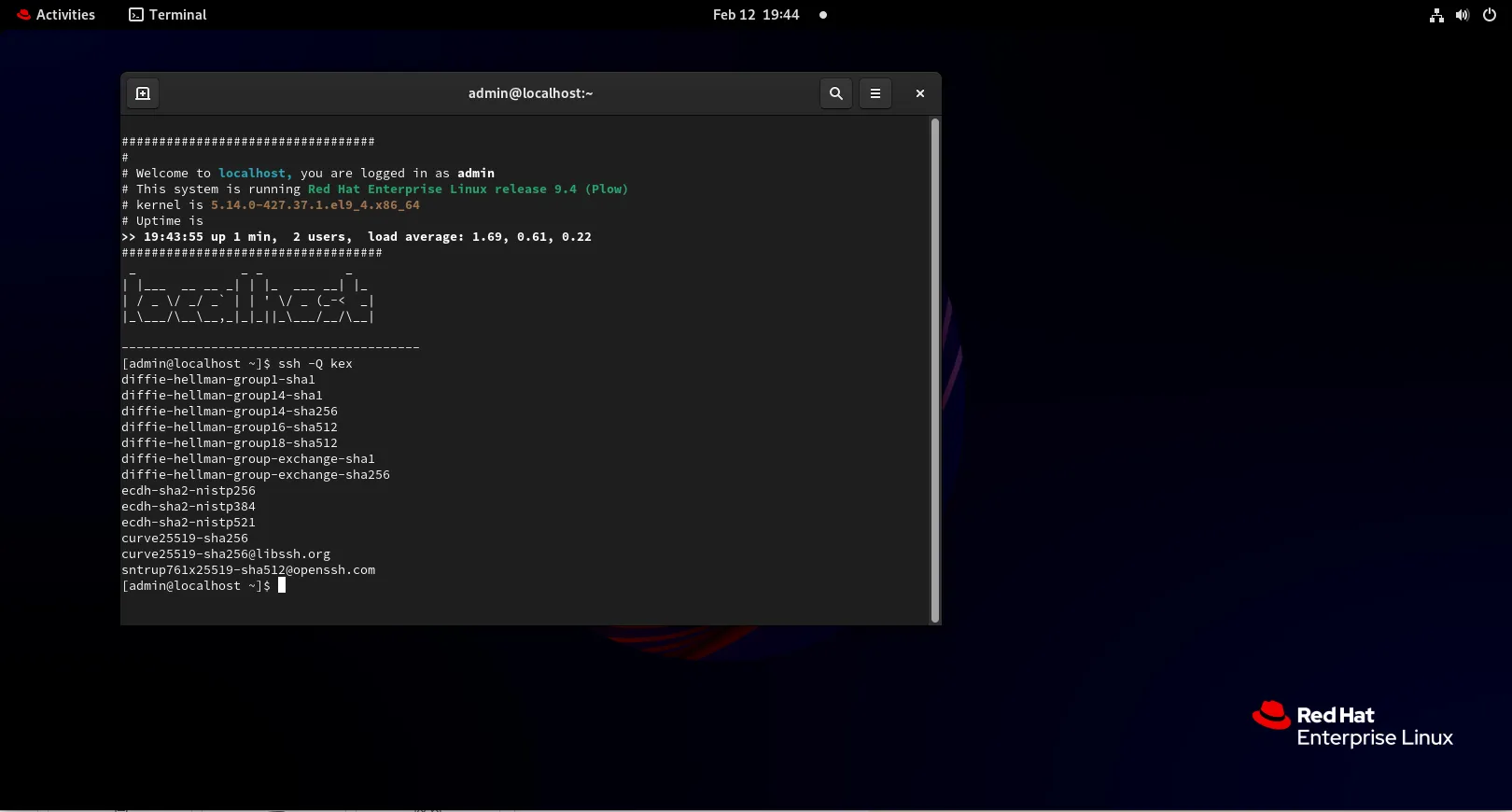
Photo by admingeek from Infotechys
diffie-hellman group 1 (1024-bit) |
|
RSA (2048-bit) |
|
ecdsa with low curve (e.g., 256-bit) |
|
diffie-hellman-group-exchange-sha1 |
|
diffie-hellman-group1-sha1 |
|
gss-gex-sha1-* |
|
gss-group1-sha1-* |
|
gss-group14-sha1-* |
|
RSA1024-sha1 |
|
RHEL 9 and CentOS 9, like other modern Linux distributions, aim to use secure algorithms by default, but it’s essential to confirm the configurations and remove weak algorithms for peace of mind.
Checking the Current SSH Key Exchange Algorithms on RHEL 9 / CentOS 9
To check the key exchange algorithms currently supported by your SSH server, you can use the following command:
ssh -Q kexdiffie-hellman-group1-sha1
diffie-hellman-group14-sha1
diffie-hellman-group14-sha256
diffie-hellman-group16-sha512
diffie-hellman-group18-sha512
diffie-hellman-group-exchange-sha1
diffie-hellman-group-exchange-sha256
ecdh-sha2-nistp256
ecdh-sha2-nistp384
ecdh-sha2-nistp521
curve25519-sha256
curve25519-sha256@libssh.org
sntrup761x25519-sha512@openssh.comThis command will list all available key exchange algorithms. If you see older, insecure algorithms such as diffie-hellman-group1-sha1, you’ll need to disable them. Additionally, you can view the current SSH configuration settings by inspecting the sshd_config file:
cat /etc/ssh/sshd_config | grep KexAlgorithmsIf the KexAlgorithms directive is not present, your server may be using the default settings, which might include weak algorithms.
Steps to Resolve Weak Key Exchange Algorithms on RHEL 9 / CentOS 9
To resolve issues with weak key exchange algorithms, follow these steps:
Backup SSH Configuration Files |
Before making any changes to your server’s SSH configuration, it’s essential to back up the existing sshd_config file to prevent misconfigurations.
cp /etc/ssh/sshd_config /etc/ssh/sshd_config.bakEdit the SSH Configuration File |
Next, you’ll need to edit the SSH configuration file to disable weak key exchange algorithms.
sudo vim /etc/ssh/sshd_configSearch for the KexAlgorithms directive. If it’s not present, add it at the end of the file. A secure configuration might look like this:
KexAlgorithms ecdh-sha2-nistp256,ecdh-sha2-nistp384,ecdh-sha2-nistp521,diffie-hellman-group-exchange-sha256,diffie-hellman-group16-sha512,diffie-hellman-group18-sha512,diffie-hellman-group14-sha256This configuration ensures that only secure algorithms are used. In this case:
|
By limiting your key exchange algorithms to these more secure ones, you significantly reduce the risk of unauthorized access.
Disable Deprecated Algorithms |
If you’re concerned about using older algorithms (such as diffie-hellman-group1-sha1), you can explicitly disable them by adding them to the Ciphers directive in the sshd_config file:
Ciphers aes256-ctr,aes192-ctr,aes128-ctrThis configuration ensures that only secure ciphers (e.g., AES) are used during communication. In modern SSH configurations, it’s also important to use secure and efficient MAC algorithms like HMAC-SHA2-256 and HMAC-SHA2-512 to ensure the security and integrity of the connection.
MACs hmac-sha2-256,hmac-sha2-512By setting the MACs directive to these two algorithms, you’re ensuring that your SSH connections are using modern and secure algorithms for message integrity.
Restart SSH Service |
Once you’ve edited the sshd_config file, restart the SSH service to apply your changes:
sudo systemctl restart sshdVerify the Changes |
To ensure that your changes have been applied successfully, you can attempt to connect to your SSH server from a client machine and check which key exchange algorithm is being used. Run the following command:
ssh -vvv user@your-server-ipLook for the kex: section in the verbose output. It will display which key exchange algorithm is being negotiated. Ensure that it matches the secure algorithms you configured.
Creating a Secure SSH Setup (Best Practices)
In addition to disabling weak key exchange algorithms, here are some other best practices for securing your SSH configuration:
|
ClientAliveInterval 300
ClientAliveCountMax 0Disable Unused SSH Features |
If your environment doesn’t require port forwarding, tunneling, or agent forwarding, disable these features to reduce attack surfaces.
AllowTcpForwarding no
X11Forwarding noSummary of Weak SSH Key Exchange Algorithms
| Algorithm | Weakness | Suggested Alternative |
|---|---|---|
diffie-hellman-group1-sha1 | 1024-bit key, SHA-1 vulnerability | diffie-hellman-group14-sha256 or Curve25519 |
diffie-hellman-group-exchange-sha1 | SHA-1, dynamic group weak parameters | diffie-hellman-group14-sha256 or Curve25519 |
gss-gex-sha1-* | Uses SHA-1 for key exchange | diffie-hellman-group14-sha256 |
gss-group1-sha1-* | SHA-1, Group 1 Diffie-Hellman | diffie-hellman-group14-sha256 or Curve25519 |
gss-group14-sha1-* | SHA-1, Group 14 Diffie-Hellman | diffie-hellman-group14-sha256 or Curve25519 |
rsa1024-sha1 | 1024-bit key, SHA-1 vulnerability | RSA-2048, Curve25519 |
By identifying and removing these weak key exchange algorithms, you can significantly improve the security of your SSH connections and prevent potential attacks.


No comments:
Post a Comment